Carmina was teaching her new friends how to start YouTube Shopping Affiliated Program . There may be a lot of people who cannot understand when they read everything in English and prefer you guiding the way you need to process. Which those cannot meet in person will show you how to start simply follow my steps. I know you can do it and earn money from your YouTube channel. I love sharing my knowledge and experience. Sign in your YouTube Channel with password . Look for YouTube Shopping Affiliated Program from your previous email or notification. Click Join today Turn on Earn commission from products check mark Tag products automatically and click Continue . Now you can go back to previous videos and tag products by going to manage videos and click which one would like to edit. From your YouTube Studio you will see Partnership by Clicking on Earn button. NOT SPONSORED. Check out my channel @ Carmina Lifestyle YouTube and click on the subscribe button for more videos...

Carmina decided to use Mary Ann for her Automated Stickers from AR Emojis where in reality we love to have fun.
Step 1: Click this Sticker
On your phone you will Click Make Stickers and when you see this Click Get this Sticker.

Step 2: Select Emojis You should know only allowed to pick 1 among the ones you've created
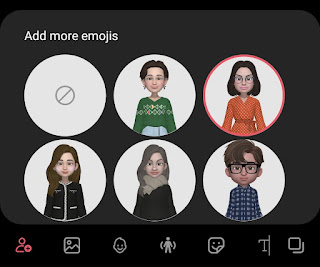
Step 3: Add to Gallery
Carmina found it easier to find in her Gallery by Clicking Add shown in the photo below this way you want to post it you can find it right away.

You can also use the AR Emojis to whomever you would like to send in Facebook Messenger to express how you feel.
They are a great way to Greet someone for their birthday just being creative is a great way for someone you've thought of may feel they are really special.

NOT SPONSORED.
Subscribe @Carmina Lifestyle YouTube Channel a place to look, discover and share.
Thank you.
Comments
Post a Comment